QAnsiTextViewer
A Qt widget that renders ANSI-encoded log text — tail logs, search them, bookmark lines, and save sessions, all behind a typed one-widget API.
-
Search & filter
Highlight with regex, jump with F3, hide non-matching lines.
-
Bookmarks
Gutter click, list panel, next/previous navigation, saved in sessions.
-
Themes
Light, dark, OS-following auto, plus custom ANSI palettes.
-
Non-blocking
Chunked async appends keep the UI alive through 100k-line bursts.
Install

Requires Python >=3.11 and PySide6 >=6.5.0.
Quick start
from PySide6.QtWidgets import QApplication
from ansi_text_viewer import AnsiTextViewer

app = QApplication([])
viewer = AnsiTextViewer()
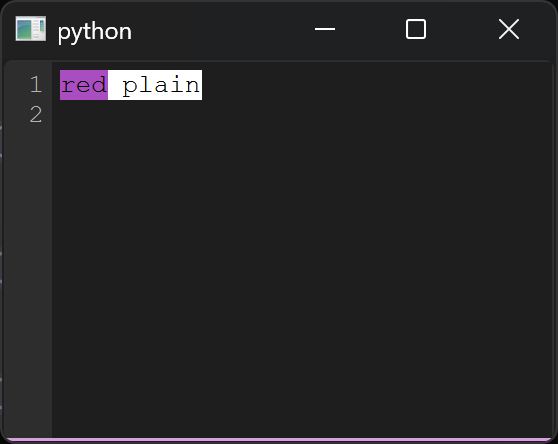
viewer.appendAnsiText("\x1b[31mred\x1b[0m plain\n")
viewer.highlight_search("red")  # F3 / Shift+F3 navigates, Esc clears
viewer.setTheme("dark")
viewer.show()
app.exec()
That snippet renders this — red ANSI text with the search match lit up:
Try the demo
just demo launches the full showcase: streaming logs, progress bars,
bookmarks, sessions, themes, and palette pickers. Prefer pictures?
Take the visual tour — every feature annotated.
API reference
| Page | Contents |
|---|---|
| Viewer | AnsiTextViewer — every method, with examples |
| Highlighting | Span, HighlightRule, all built-in rules |
| Internals | ANSI decoding, search engine, gutter |
Untrusted logs
Log content is untrusted by design. Links open only on Ctrl + click,
cursor jumps are clamped, and huge lines are truncated. For hostile
logs, call viewer.setLinksEnabled(False).